
Song Screen
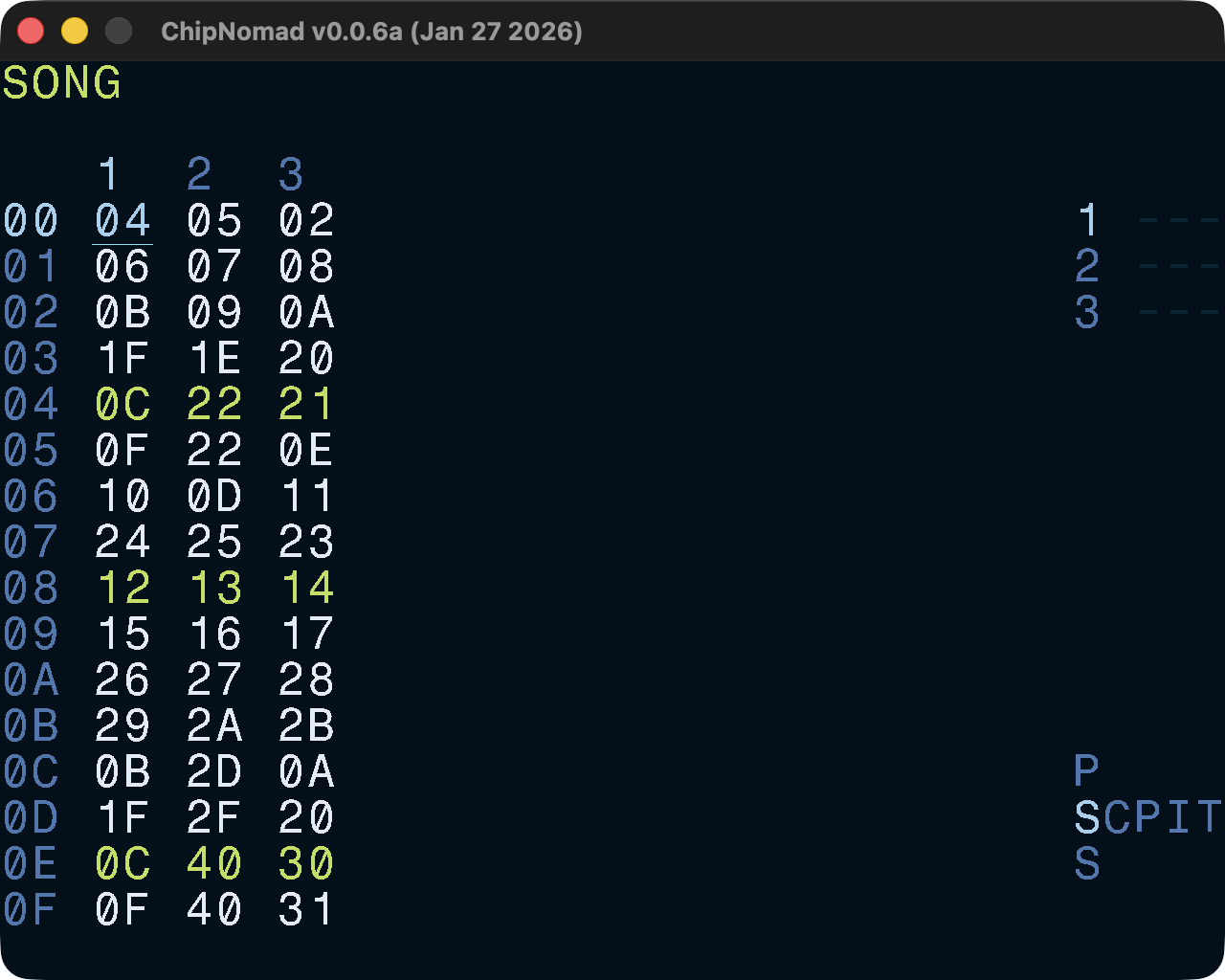
Arrange chains into a complete song. Tracks are arranged left to right and sequence of chains is arranged vertically. Each track is fully independent and since chains can have from 1 to 16 phrases tracks can go out of sync with each other. To avoid that, design your chains to stay in sync. It is common to allocate one chain for empty phrases, usually 00 or FE.
You can have multiple sub-songs in a project by creating “islands” — sections separated by empty rows.
Controls
In addition to the common controls the following controls are available:
- OPT + [UP or DOWN]: jump 16 positions up/down
- Select range, then SHIFT + EDIT: shallow clone — cloned chains will have the same phrases
- Select range, then SHIFT + Double-tap EDIT: deep clone — clone both chains and phrases in chains
- Select range, then EDIT + [UP or DOWN]: move selection up or down
- Triple-tap OPT: add/remove a highlight, use it for visual organization of the project
- OPT + SHIFT: Mute current track (release OPT first to hold the mute)
- OPT + PLAY: Solo current track (release OPT first to hold the mute)
- OPT + [LEFT or RIGHT]: solo all tracks to the left or to the right of the current track